
Fact-checked by the digital reach solutions editorial team
Quick Answer
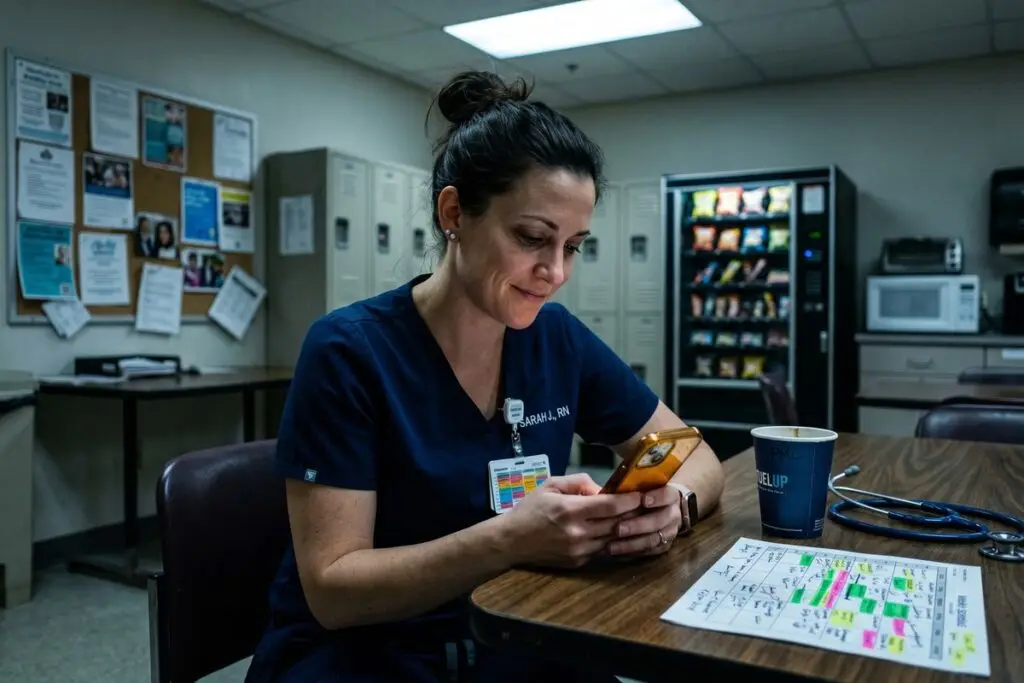
As of July 2025, nurses and shift workers use phone hacks like automated Do Not Disturb schedules, color-coded calendar systems, and shift-synced alarm stacks to manage rotating hours. Studies show shift workers sleep 1–4 fewer hours per night than day workers, and 72% report using smartphone tools to compensate for schedule disruption.
Phone hacks for shift workers are deliberate smartphone configurations — not apps alone — that automate schedule management, protect sleep windows, and reduce cognitive load between 12-hour rotations. According to the CDC’s NIOSH shift work research, rotating schedules affect roughly 15 million full-time U.S. workers, with nurses and emergency responders bearing the highest burden of circadian disruption.
The problem is no longer awareness — it is execution. Most shift workers own a capable smartphone but use fewer than 20% of its scheduling features. The right configuration turns that device into a 24-hour schedule manager that works even when you cannot.
Why Do Standard Phone Settings Fail Shift Workers?
Default phone settings are built for a 9-to-5 lifestyle and actively work against rotating schedules. A standard alarm app offers no rotation logic, and a factory Do Not Disturb window assumes you sleep at night — neither assumption holds for a nurse finishing a night shift at 7 a.m.
The mismatch creates a measurable health cost. Research published by the Sleep Foundation links rotating shift work to a 33% higher risk of sleep disorders compared to fixed-schedule workers. When your phone vibrates with notifications at 9 a.m. because that is when the world wakes up, your post-night-shift sleep is fractured before it begins.
The Core Configuration Problem
Most workers set one alarm profile and one DND window — and never revisit them. A rotating schedule needs at least three distinct phone profiles: day-shift mode, night-shift mode, and off-day mode. Without that structure, the phone defaults to one setting and creates conflicts every rotation.
Understanding how iPhone Focus Mode compares to Android Bedtime Mode is essential before building these profiles, because the native tools differ significantly in automation depth and scheduling flexibility.
Key Takeaway: Default phone settings assume a fixed day schedule and actively disrupt shift workers’ sleep. The Sleep Foundation reports a 33% higher risk of sleep disorders for rotating shift workers — making intentional phone configuration a direct health intervention, not just a convenience.
What Are the Best Phone Hacks Shift Workers Actually Use?
The most effective phone hacks for shift workers share one trait: they are set once and run automatically, requiring zero willpower at 3 a.m. after a 12-hour shift. These are not productivity tips — they are automation systems.
Alarm Stacking and Rotation Labels
Rather than setting a single alarm, experienced nurses use alarm stacks — groups of 3 to 5 alarms spaced 5 minutes apart, labeled by shift type (e.g., “DAY SHIFT WAKE,” “NIGHT SHIFT WAKE”). Both iOS and Android allow alarm labels. The label serves as a rapid cognitive anchor when you wake disoriented mid-rotation.
Pair this with alarm groups that can be enabled or disabled as a batch. Android’s built-in Clock app supports this natively. iPhone users can use Shortcuts automations to toggle alarm sets based on a calendar trigger.
Focus Mode Profiles for Each Shift Type
Both iOS Focus Mode and Android’s Digital Wellbeing allow custom profiles with specific allowed contacts, silenced apps, and auto-reply messages. Build three named profiles — Day Shift, Night Shift, Off Day — and schedule each to activate based on your rotation calendar. This single step eliminates the need to manually silence your phone before every sleep window.
For deeper control over notification filtering, the comparison guide on iPhone vs. Android notification management breaks down exactly which system gives shift workers more granular control.
Calendar Color-Coding and Shared Access
Color-coded calendar blocks — one color per shift type — give a visual snapshot of the week in under two seconds. Share the calendar with family members so they understand your sleep windows without requiring a conversation every rotation cycle. Google Calendar and Apple Calendar both support shared calendars with individual color assignments.
Key Takeaway: The highest-impact phone hacks for shift workers automate three things: wake-up timing, notification silencing, and schedule visibility. Building 3 distinct Focus Mode profiles — one per shift type — eliminates manual configuration at the moments when cognitive load is highest. See this platform comparison to choose the right tool.
Which Apps Give Shift Workers the Most Scheduling Control?
Native phone tools cover the basics, but dedicated apps add rotation logic that iOS and Android calendars cannot match. The right app calculates your next shift, auto-populates your calendar, and syncs with coworkers on the same rotation pattern.
| App / Tool | Best For | Key Feature |
|---|---|---|
| Shift Work: Schedule Planner | Rotating pattern automation | Repeating pattern builder (e.g., 3-on/2-off) |
| ShiftPlanning (Humanity) | Team-wide schedules | Manager-to-staff schedule push with alerts |
| Google Calendar + Shortcuts | iOS/Android cross-platform users | Calendar-triggered Focus Mode automation |
| Alarmy | Heavy sleepers post-night shift | Mission-based dismissal (math, barcode scan) |
| Sleep Cycle | Sleep quality tracking | Smart alarm within a 30-minute wake window |
Shift Work: Schedule Planner is particularly effective because it understands rotation patterns — you input your schedule structure once (e.g., 2 days on, 2 nights on, 4 off) and it populates months of calendar entries automatically. This removes the weekly manual entry that most shift workers abandon within 30 days.
Sleep Cycle addresses a separate but critical problem: waking at the wrong point in a sleep cycle leaves you more impaired than waking slightly late. Its smart alarm window is especially valuable after night shifts, when sleep debt compounds quickly.
“Shift workers who actively manage their light exposure and sleep scheduling with technology report significantly better subjective sleep quality — the phone is the most accessible tool they have for behavioral intervention.”
Key Takeaway: Dedicated rotation apps like Shift Work: Schedule Planner outperform native calendars because they understand repeating patterns — reducing weekly manual entry to zero after initial setup. Pairing them with a smart alarm app like Sleep Cycle directly addresses the sleep-cycle disruption documented by NIOSH shift work research.
How Do Nurses Use Automated Messaging to Manage Off-Hours Communication?
Automated messaging is one of the most underused phone hacks for shift workers. Setting an auto-reply that states your current shift window eliminates the social pressure to respond immediately — and protects sleep without requiring manual explanation every rotation.
iOS Focus Mode allows a custom auto-reply for text messages, activated automatically when your sleep profile is active. Android’s Digital Wellbeing does not offer native auto-reply, but Google Messages and third-party tools like AutoResponder for WA fill that gap for WhatsApp and SMS threads.
Scheduling Message Delivery
Both iOS 17 and Android 14 support scheduled message sending natively — a feature many shift workers overlook. A nurse finishing a night shift can draft a message to a school, a landlord, or a colleague and schedule it to send at 9 a.m., projecting normal availability without being awake to send it manually. This mirrors the approach used by freelancers who, as covered in this automated messaging guide, cut response time pressure dramatically through pre-scheduled communication.
Family Contact Allowlists
The most critical auto-message configuration is the emergency bypass. Both iPhone and Android allow specific contacts to ring through any DND or Focus Mode setting. Set 2 to 3 emergency contacts — a partner, a parent, the charge nurse line — to bypass silencing. All other contacts receive an auto-reply. This creates a clear separation between genuine emergencies and routine messages that can wait 8 hours.
Key Takeaway: Automated messaging and contact allowlists let shift workers protect sleep without social friction. iOS Focus Mode auto-reply and scheduled sends — available since iOS 17 — mean nurses can draft non-urgent messages during shift and deliver them during normal hours automatically, reducing communication-related sleep interruption. See the automated messaging guide for setup strategies.
What Screen Time and Usage Habits Actually Protect Shift Worker Sleep?
Phone hacks for shift workers are not just about scheduling — screen behavior in the 60 minutes before sleep has a direct physiological impact. Blue light exposure from screens suppresses melatonin production, and research from the National Institute of Environmental Health Sciences links night-shift light exposure to a measurable disruption of circadian rhythm regulation.
The solution is a pre-sleep phone routine enforced by the phone itself — not willpower. Both iOS Screen Time and Android Digital Wellbeing allow app-category downtime windows that block social media, news, and entertainment apps during a defined period before your scheduled sleep start.
Using Screen Time Tools the Right Way
Most shift workers set up Screen Time once and then bypass the PIN immediately when the block triggers. The more durable approach is to have a trusted person set the PIN — a partner or roommate — removing the option for self-bypass entirely. For a structured walkthrough of these native controls, the guide on how to use your phone’s built-in Screen Time tools covers both iOS and Android configurations step by step.
Additionally, enabling Night Shift (iOS) or Night Mode (Android) on a rotation-based timer — not a fixed daily schedule — ensures warm screen tones activate based on your actual sleep window, not a generic sunset time that has no relevance to your shift pattern.
Key Takeaway: Pre-sleep screen behavior is a clinical variable, not just a habit. The NIEHS links night-time light exposure to circadian disruption — making a 60-minute app downtime window before sleep one of the highest-impact, zero-cost phone hacks shift workers can implement today.
Frequently Asked Questions
What is the best free phone app for rotating shift schedule management?
Shift Work: Schedule Planner is widely regarded as the top free option for rotation-based scheduling. It accepts any repeating pattern, auto-populates your calendar, and integrates with Google Calendar for family sharing. The free tier covers the core rotation-building feature without a subscription.
How do I stop my phone from waking me up during day sleep after a night shift?
Create a dedicated Focus Mode or DND profile that activates automatically at the end of your night shift — for example, 7:30 a.m. to 3:30 p.m. Allow only 2 to 3 emergency contacts to ring through. Set an auto-reply so contacts know you are unavailable and when you will respond.
Can iPhone Focus Mode be set on a rotating schedule rather than a fixed daily time?
Yes, but not natively through the Focus settings menu. Use the iPhone Shortcuts app to create an automation that enables a specific Focus profile when a calendar event with a defined keyword (e.g., “NIGHT SHIFT”) starts. This ties your Focus Mode to your actual schedule, not a fixed clock time.
Do phone hacks for shift workers actually improve sleep quality?
Yes, when implemented consistently. The Sleep Foundation documents that behavioral interventions — including controlled light exposure and notification management — improve subjective sleep quality for shift workers. Phone automation makes these interventions consistent without requiring active effort after every rotation change.
What is alarm stacking and how does it help nurses on rotating schedules?
Alarm stacking means setting multiple labeled alarms in a 5-to-10-minute window rather than a single alarm. Each alarm is labeled with the shift type — “DAY SHIFT WAKE” or “NIGHT SHIFT WAKE” — providing an immediate cognitive anchor when waking disoriented. Both iOS and Android native clock apps support labeled alarm groups.
How do I share my rotating schedule with family members using my phone?
Use Google Calendar or Apple Calendar with a shared family calendar. Color-code each shift type — one color per shift category — and share the calendar with family members so they can view your sleep windows and shift times without asking. Both platforms support real-time syncing across devices at no cost.
Sources
- CDC NIOSH — Shift Work and Long Work Hours
- Sleep Foundation — Shift Work Disorder
- National Institute of Environmental Health Sciences — Light at Night
- U.S. Bureau of Labor Statistics — Workers on Flexible and Shift Schedules
- National Institutes of Health / PubMed — Circadian Disruption and Health Outcomes in Shift Workers
- American Medical Association — What Doctors Wish Patients Knew About Shift Work Sleep Disorder
- World Health Organization — Mental Health at Work